I would like to start off by saying that this is not a tutorial on how to do an inventory system, it is just an explanation as to how I made mine. Mine could be terrible compared to professionals or completely different from how other people will do it.
Along the way, I’ll have pictures and poorly made pictures in paint to try and explain it better.
So, let’s begin.
An inventory system. There are many types of inventory systems and it really comes down to what you want the system to do, and in this post, I’m going to be explaining the one used in Project Living.
You could use a drag and drop type inventory where you rearrange the items as you wish. Or it could be like an RPG where you can’t rearrange them and have very few slots as items usually don’t stack.
For this game, I used a drag and drop style inventory. A 2D grid that is full of slots and a Hotbar for the player.
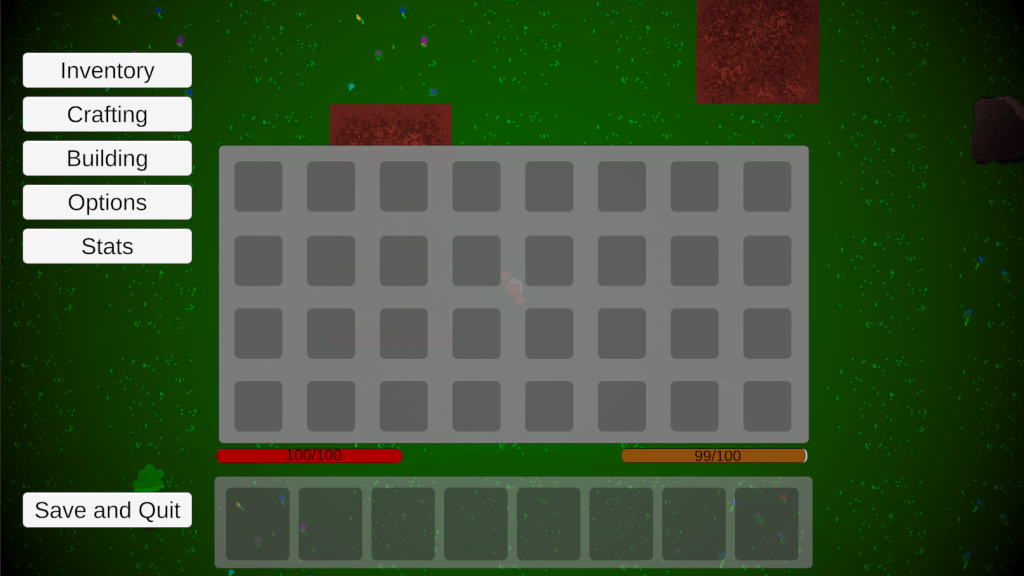
A big feature of the inventory is the rearranging of items. The player should be able to move items about as they wish as well as have items stack. These were the main requirements the system needs to fill.
I suggest always thinking of your base requirements and work backwards.
So, how would you go about doing this? Well, there are a number of ways, None of them are right, but some are ‘better’ than others.
What I did, was create an item slot script. This script was designed to be used on everything. Chests, furnaces, player inventory, Hotbar. All of them use the same item slot with the exact same script, in fact, they are just the same prefab.
I could arrange the inventory how I wanted and have as many as I want. But there is more to the item slots then just that.
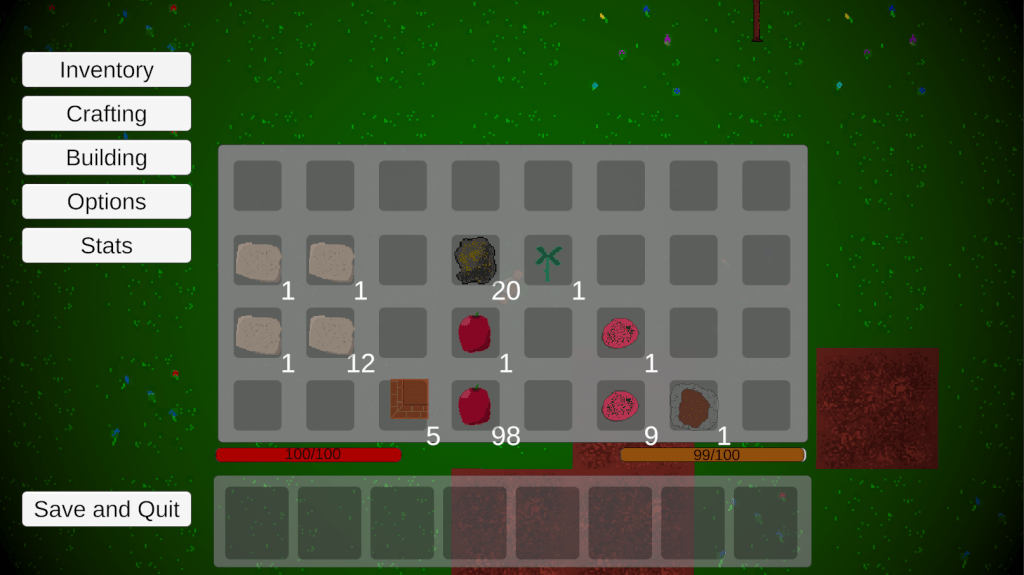
The actual storing of items is important, and this is where it could get confusing. I’ll try my best to explain it.
Everything that has an inventory (player and chests) has a base inventory script on it. This script is inherited from as needed, but that base inventory has a few important variables.
These important variables come in the form of 2 arrays, an int array and an item array (item is a scriptable object that all the items inherit from).
These arrays are the same size, the size of the inventory and together they hold the information of the inventory. The items array tells me what item is in what slot (each item slot corresponds to an element in the array) and the int array tells me how much of that object there is.
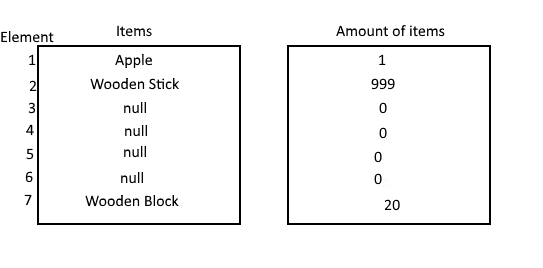
Another confusing explanation for you:
Originally, it was the array that told the item slots what was in them, but this caused issues down the line. Now, it is the other way around. The item slots tell the array what they have in them and the array keeps track of it. So, an item slot holds its own information about what item it holds and how much of that item.
Now, this part may cause controversy. This inventory system manipulates arrays to move items around, I don’t exactly know how performance heavy that is. Everything I read seemed to be conflicting, but It doesn’t lag in-game so I have no issues. You probably could come up with some solution that actually doesn’t need an array but arrays make it easy when it comes to saving.
Moving on, picking up items and moving them. How do I do it? It’s simple, I have a “fake” item slot on the player. When the player clicks something, the contents of that item slot are placed into the fake item slot and removed from the item slot that was just clicked. I can then just place it down (with a little bit of coding).
Of course, this gets more complicated when it comes to the other scenarios that can occur. Placing an item on a slot already with an item should swap the below item with the one in your hand. Placing an item of the same type should stack, assuming if there is space left in the stack.
I’m not going to say how I programmed them but it was pretty easy since the “fake” item slot holds the information for both item and amount.
That’s pretty much it. Because each inventory slot only needs to worry about what item array it is connected to, it means I can easily make things like chests and have them work with little hassle.
I think programming is all about planning for the future you wish to create. So try and make things easier for yourself now before you regret it later
This inventory system is full of bugs still. There are some issues with picking up items where it doesn’t pick up correctly and deletes it from your inventory, it’s rare but happens sometimes.
As I said, this isn’t a tutorial, and purely just a bad explanation for those that are interested.
Sorry if it was confusing, I’m just getting back into the blog flow and hopefully, I’ll be better for the next one (whenever that comes out).
Thanks for reading. Be sure to follow so you don’t miss a post, maybe next time I’ll talk about crafting. Below is a link to my linktree where you can find all my other things, twitter, Kofi (if you want to support me) and some other stuff. Once again, Thanks for reading, and I hope you all have a wonderful day.

 SlippyfopTV's Random Ramblings